How We Replaced an Entire Web Publication Team Using AI Infused Automation – POC
.png&w=3840&q=75)
This POC involves a job aggregator website, a platform that collects and presents job opportunities from multiple institutions in a single location for job seekers. Traditionally running such a website requires a team: a content creator to draft detailed job posts and a graphic designer to produce engaging thumbnails or images. This manual process is time consuming and also demands constant attention to make sure posts are timely and visually appealing.
My approach demonstrates how AI infused automation can streamline this entire process, replacing manual effort while delivering content faster and more efficiently.
The platform in question receives job postings in three primary formats (Images, PDFs, and Web URLs).
This solution allows site administrators to submit these inputs directly into a n8n pipeline that generates ready-to-publish website posts, including a thumbnail image, in under 30 seconds. This automation dramatically reduces the time and effort compared to traditional manual publishing.
An added advantage is the mobility. Admins can perform submissions and approvals from their phones whether commuting or standing in line at a grocery store. The only requirements are the Discord or WhatsApp mobile app to submit inputs and the Jetpack app to approve draft posts. My testing has confirmed successful post creation across these scenarios.
01Introduction – The Use Case
The platform receives job postings in three primary formats:
02High Level Workflow Architecture
The pipeline uses n8n workflow automation which integrated to Discord, OCR services, LLMs, and WordPress as the CMS. The workflow converts raw job inputs into fully structured posts complete with SEO friendly content and thumbnails.
.jpg&w=3840&q=75)
03Node by Node Walkthrough
A detailed breakdown of how the workflow processes each input from Discord submission to WordPress draft.
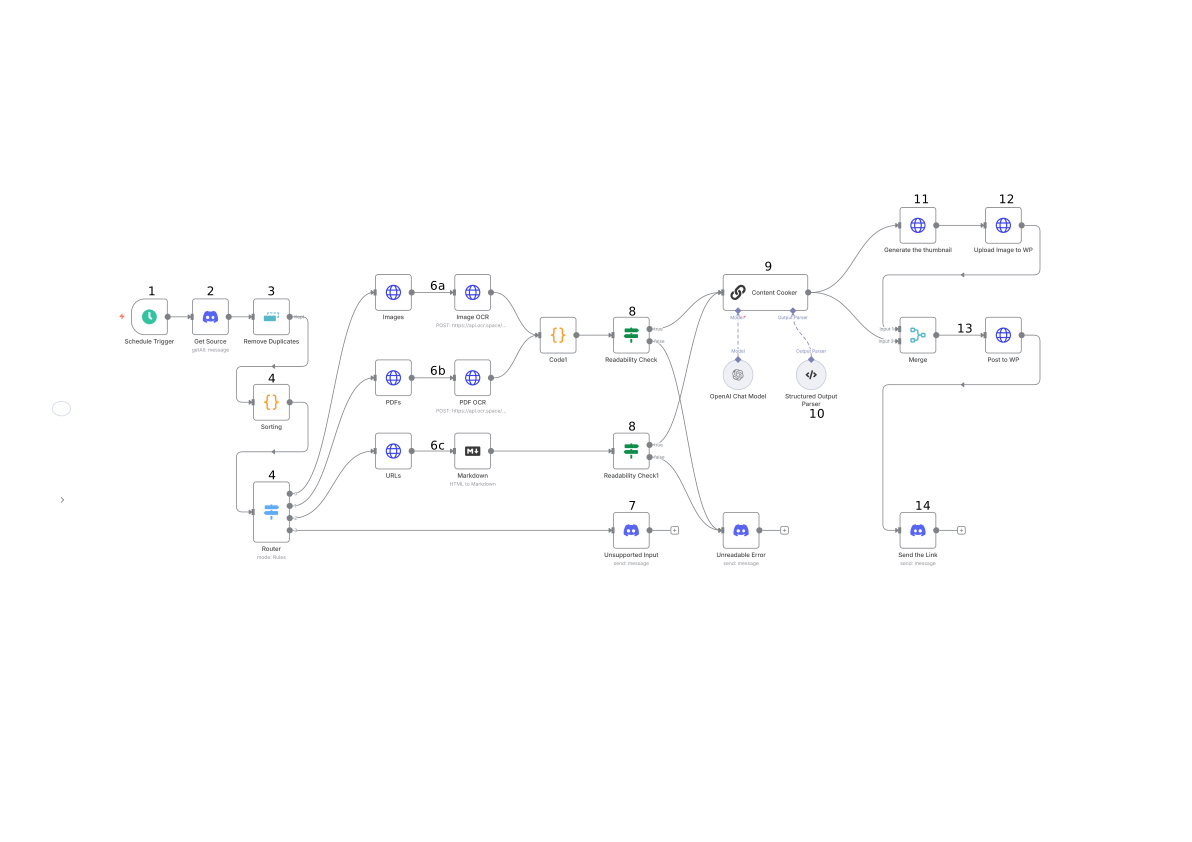
1. Schedule Trigger
The workflow is designed to check for new inputs every minute. It triggers the Discord node to fetch the latest messages.
2. Discord Node (Get Source)
Once the Schedule trigger initiate the workflow the Discord node connects to a dedicated channel where admin share job advertisements. It retrieves the message content with job post images, PDFs and URLs while also recording details such as the sender's name, timestamp, and message ID.
This node acts as the bridge between human input and automated processing turning every message into a structured data object.
3. Remove Duplicates
To maintain workflow integrity and prevent the reposting of the same content this step involves a deduplication check. This node compares each new message against previously processed entries using either message IDs or content hashes.
Only unique messages are passed forward. This small but critical step make sure that the automation handles each job post once even if a message is accidentally resent on Discord.
4. Code Node (Input Classification)
At this stage the workflow evaluates what type of input it has received. A code function inspects each message and categorizes it as an image, a PDF, a URL, or an unsupported format. This classification determines which branch of the workflow will handle the input next.
The logic is straightforward. An image is sent to the OCR route, a PDF to the text extraction route, and a URL to the scraper route. Anything else is marked as unsupported and rerouted for notification node which yells at the admin.
5. Router Node
The Router node acts as the decision maker of the pipeline. Based on the classification from the previous code node it directs the data down the correct processing path. This branching mechanism keeps each workflow segment clean and purpose built.
The image, PDF, and URL branches each contain their own set of specialized nodes that extract and process job information, while unsupported inputs are gracefully handled by a separate notification path.
6. a. Image Branch – OCR Extraction
When the input is an image this branch engages an OCR service to extract readable text. The image is first pre processed before being sent to an external OCR API. The output is plain text showing the content of the job post. This conversion allows image adverts which are often shared as posters or social media flyers to be transformed into editable text that the Content Cooker node can later structure into a proper article.
6. b. PDF Branch – PDF Text Extraction
For PDF inputs this branch utilizes a specialized node to read and extract all text from the document. This is particularly useful for formal job descriptions which are often shared as multi page files. The extracted text is then cleaned of formatting and passed down to the main pipeline for content generation.
6. c. URL Branch – Web Scraping
If a web URL is provided this branch uses a scraping node to visit the webpage and extract the job details directly. It targets specific HTML elements to capture the job title, requirements, and application instructions. This ensures that even job posts hosted on external career portals can be seamlessly integrated into the publication workflow without manual copying and pasting.
7. Unsupported Content Branch
If an input doesn't fit into the three categories (e.g., an audio file or a video) it is directed to the unsupported content branch. This path triggers a notification back to the admin via Discord or WhatsApp letting them know the file type is not supported. This ensures that the admin is always aware of the status of their submissions.
8. Text Validation (Code + If Node)
Once text is extracted from an image, PDF or URL it undergoes a validation check. A code node removes unnecessary white spaces, special characters or OCR errors. An IF node then checks if the resulting text contains enough information to form a job post. If the text is too short or lacks context the workflow stops and notifies the admin.
9. Content Cooker (LLM Node)
The heart of the workflow is the Content Cooker node which uses a GPT based AI model (got-4.1-mini) to transform the raw extracted text into a professional, structured job post. The LLM is given a specific prompt to identify the job title, company name, key responsibilities, qualifications, and application deadline.
It also writes an engaging introduction and meta description optimized for search engines ensuring that each post is ready for publication.
10. Structured Output Parser
The output from the LLM node is passed through a parser that organizes the information into a structured JSON format. This step is crucial for the WordPress node as it ensures that each piece of information (Title, Content, Categories, Tags) is correctly mapped to the appropriate fields in the CMS.
11. Thumbnail Generation
Simultaneously with content generation, the workflow triggers a custom script to create a thumbnail image for the post. Using a pre defined template the script overlays the job title and company logo onto a background image.
- Express: To handle incoming requests from n8n.
- Canvas: To programmatically draw text and images onto a template.
- Sharp: To resize and optimize the final image for the web.


12. WordPress Publication and Discord Notification
The final step is the publication. The structured content and the generated thumbnail are sent to the WordPress node which creates a new draft post on the website.
Once the draft is created a final notification node sends a summary to the admin on Discord. The notification includes the job title, a link to the draft post and a confirmation that the process was successful. This allows the admin to review and publish the post with a single tap on their phone.
04Results of the POC
Three test scenarios were run to validate the pipeline across all supported input types.
Test 1 – Image based Job Post
An image-based job advertisement was submitted via Discord. The OCR branch extracted the text, the Content Cooker generated the post, and a thumbnail was produced automatically.


Test 2 – Document based Job Post
A formal job description PDF was submitted. The PDF extraction branch parsed the document and the pipeline produced a fully structured WordPress draft.

Test 3 – URL based Job Post
A careers page URL was submitted. The scraping branch visited the page, extracted the job details, and the pipeline drafted the post without any manual input.


05Efficiency and Impact
The results of the POC were clear.
| Metric | Result |
|---|---|
| Speed | Manual publishing (15–20 min per post) reduced to under 30 seconds |
| Consistency | Every post follows a standard format with SEO optimized content and professional thumbnails |
| Scalability | The pipeline can handle hundreds of submissions per day without additional staff |
| Mobility | Administrators can manage the entire platform from their mobile devices while on the move |
06Broader Applications
While this POC was built for a job aggregator the same architecture can be applied to many other industries.
- News and Media: Automating the drafting of news articles from press releases or social media updates.
- E-commerce: Creating product descriptions and marketing images from manufacturer spec sheets.
- Real Estate: Generating property listings from photos and appraisal documents.
- Event Management: Producing event pages and promotional materials from flyer images or email invites.
07What's Next
The next phase of this project involves integrating more advanced AI models for deeper content analysis and adding support for multi language translation. I am also exploring ways to integrate this pipeline directly with social media platforms allowing for automated cross posting of every new website post.
This POC proves that the future of content publication is not just automated but AI infused. By replacing manual workflows with intelligent pipelines businesses can operate faster, leaner and with far greater impact.
Enjoyed this article?
If this topic resonated with you or sparked an idea around technology, delivery, or digital strategy, feel free to reach out.